BrickEngineer: LEGO Design

LEGO Engineering for LEGO NXT and Robot Enthusiasts

NEW LEGO Storage Opportunities


Click here to visit HobbyTron.com

I have recently found some new and interesting LEGO storage units.

This is the IRIS LEGO 6-Case Workstation and Storage Unit

There is a smaller version with three drawers.
IRIS LEGO 3-Case Workstation and Storage Tabletop with 1 Base Plate

This is another design called the BOX4BLOX Lego Organizer.

If you don’t have a large enough collection to warrant drawer-type organizers. Here are some options using bins:
LEGO 4-piece Square Stacking Basket Set with Wheels TSB-SQ

or the
Lego 4PC Project Case Set each case of which has dimensions (3.125″H x 13″W x 12.25″D).

This is an interesting possibility: The Container Store LEGO Storage Brick (2×4), which comes in several colors

which also comes in a smaller size
The Container Store LEGO Storage Brick (2×2)

and smaller still…
The Container Store LEGO Storage Brick

and smaller still!
The Container Store LEGO Storage Brick

or you can always revert to the plain white IRIS 6 Drawer Cart

Be sure to check out our older posts on LEGO storage:
Colorful LEGO Storage Ideas
Storing Your LEGO Collection

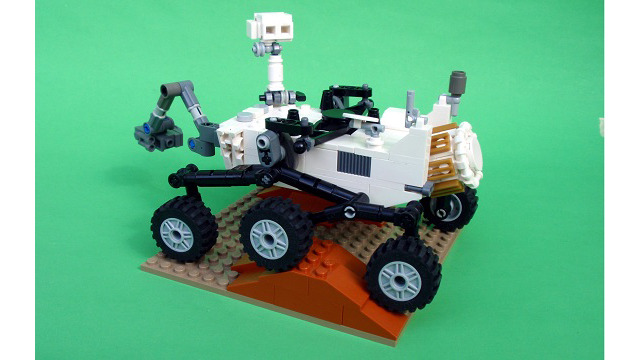
KnuthLab LEGO Exploration Rover

Image of KnuthLab Exploration Rover

KnuthLab Exploration Rover with Researchers A. Fischer and N. Malakar

The Knuth Cyberphysics Laboratory in the University at Albany Physics Department has developed the KnuthLab LEGO Exploration Rover, which acts as a testbed for robotic intelligence and navigation software. Development of this rover was funded by a NASA SBIR Award (Advanced Bayesian Methods for Lunar Surface Navigation) through Autonomous Exploration Inc. as well as a University at Albany Faculty Research Award (Developing Robotic Explorers, PI: K.H. Knuth).

The LEGO Exploration Rover is powered by six NXT Standard Motors in a Rocker-Bogie suspension system used in all of the NASA Mars rover designs. The rover is approximately 1.5 ft high with a 1 ft x 1.5 ft base. It is larger than the NASA Sojourner Rover, which was part of the Pathfinder Mission to Mars in 1997, and smaller than the Mars Exploration Rovers Spirit and Opportunity. It can safely carry a payload of 8 pounds.

Image of KnuthLab LEGO Exploration Rover

KnuthLab LEGO Exploration Rover


The LEGO Exploration Rover has two laptop bays built into the box-like frame in which it can carry two Asus Eee Laptops for onboard processing. The wheels are controlled by two LEGO NXT bricks, which can communicate with the laptops via Bluetooth. The rocker-bogie suspension and low speed allows it to handle relatively rugged terrain and steep grades.

The white frame mounted on top of the rover is the Bayesian Vision-Based Navigation System being developed by Autonomous Exploration Inc. for NASA.

Check back, as we will be posting videos of its operation and discussing some of the important design features.

DIY Arduino Circuit

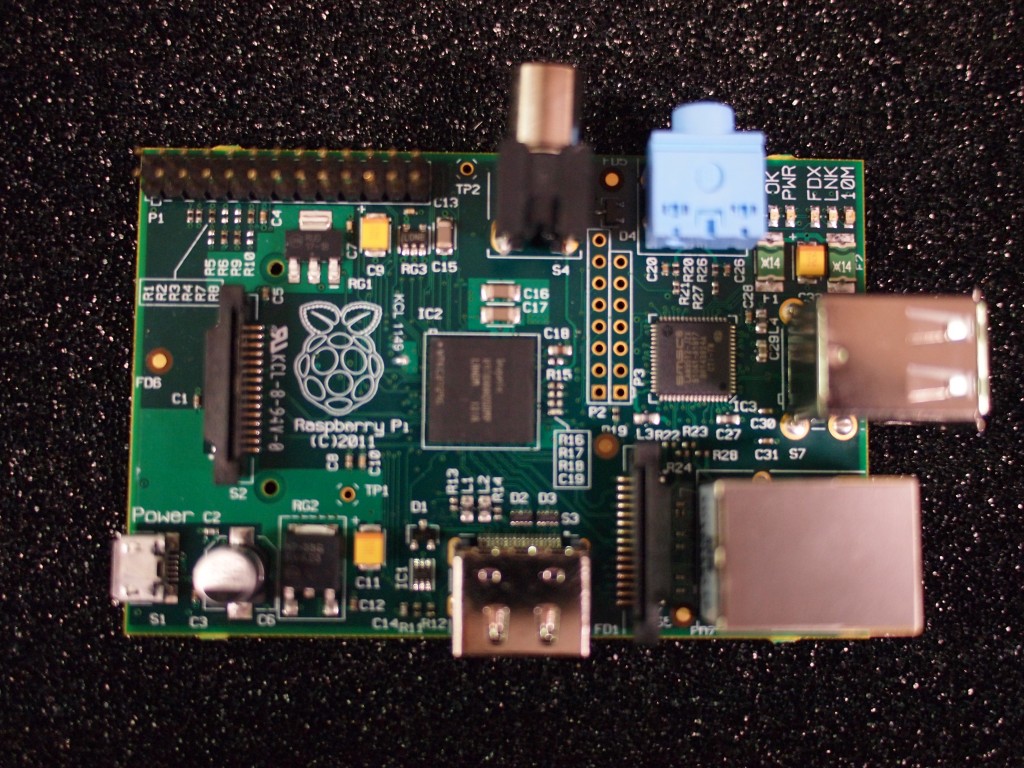
Jameco.com has an interesting article on how to build your own Arduino microcontroller circuit.

Image of a circuit board

The circuit relies on an ATMega328 microcontroller, and since it requires only component parts it is cheaper and has a potentially smaller footprint than the popular Arduino Boards.

We have started using Arduino microcontrollers to directly control the LEGO Motors (9842), and expect to post on this sometime in the near future. In the meantime check out posts on LEGO NXT motor control:

LEGO NXT Motor Wiring

Hacking the LEGO Mindstorms NXT Standard Motor

Naughty Nestor is Bent on Destruction

Some time ago, I invented this character Naughty Nestor.

Naught Nestor

Ready to Blow up some LEGO creations!

Nestor does not play well with others.
He doesn’t play well at all.
His favorite pastime is blowing up LEGO creations.

Here is an example of what Nestor is capable of.
This creation is called Stalker and it was created by Misterhaan.
But Stalker is being stalked!
Look out Stalker!
Look out for Nestor!

Look out Stalker! You are being stalked!

This animation was made using LDraw, POVRay and a Matlab script that generated a set of POVRay files each with the parts individually spinning and moving away from the blast center. Add a flash of light in a few images, and voila! Explosion!

You can find this video on Youtube as well at:
http://www.youtube.com/watch?v=9Pmz8soKdko.
Share it with your friends!

Colorful LEGO Storage Ideas

In a previous post, Storing Your LEGO Collection, I discussed various options for storing one’s LEGO collection. Several of these options included tackle boxes since they can hold several utility boxes with adjustable partitions, while providing top bulk storage. I have found them to be quite useful in providing portable storage for small to medium LEGO collections.

Plano has come out with a new line of colorful tackle box designs geared for arts and crafts storage. These are the Creative Options
line of Storage Boxes and Organizers. The color scheme is a avocado green base with a purple lid and gold handles. These storage units are excellent for storing small LEGO collections while providing portability.

Here are some of the available models:

Grab N’ Go Rack System with 2 Deep #2-3630′s and 1 #2-3650 -Avocado Base/Purple Lid/Gold Handle

It comes with Two Deep #2-3630′s and One #2-3650 Prolatch Utility Boxes and Bulk Top Storage. It has dimensions: 13.1 x 9.9 x 13.6 inches

Multi-Craft Rack System

This includes three 2-3650 and two 3449 utility boxes and a compartmentalized top access storage on lid and large bulk storage area. Its dimensions are 17-3/4-Inch (Length) x 9-3/4-Inch (Width) by 11-Inch (Height).

Creative Options Grab & Go Storage Box/Organizer

This includes four #2-3500′s Prolatch Utility Boxes and Bulk Top Storage. ITs dimensions are 11-Inch (Length) by 7-1/4-Inch (Width) by 10-Inch (Height)

Be sure to check out some new ideas at:
New LEGO Storage Opportunities

Interface a Potentiometer to the NXT

NOTE: WE ARE NOT RESPONSIBLE FOR ANY DAMAGE YOU MAY DO TO YOUR NXT BRICK.
THIS EXERCISE PRESUMES SOME WORKING KNOWLEDGE OF ELECTRONICS.

In this exercise, I will walk you through interfacing a potentiometer (variable resistor) to the NXT brick.
You will need:
- A stripped NXT cable
- A potentiometer with a maximum resistance no more than $10 k\Omega$
- A small piece of wire
- An NXT Brick

This exercise is derived and expanded from a chapter in Extreme NXT by Gasperi, Hurbain and Hurbain.

THEORY

The NXT monitors the potential difference between the black and white wires with an Analog-to-Digital (A/D) converter. The A/D converter converts this potential difference to a RAW value between 0 and 1023 (10 bits accuracy). This RAW value is given by the ratio

(1) $RAW = \frac{RAW_{max}}{V_{max}} V_{R} = \frac{1023}{5} V_{R}$

where $RAW_{max}$ is the maximum RAW value of 1023, $V_{max} = 5V$ is the voltage used by the NXT A/D Converter, and $V_{R}$ is the voltage drop between the black and white wires.

The circuit diagram looks like this:

NXT A/D Converter Schematic

I have a little $1k\Omega$ potentiometer that can turn over a range of about $0^{\circ}$ to $270^{\circ}$. Below is a diagram. The resistance between the leftmost and rightmost pins is the maximum resistance of $1k\Omega$. We will focus on the resistance between the leftmost and center pins, which varies based on the angle through which the potentiometer has been rotated. To keep things safe, we wire the center pin and rightmost pin together. This doesn’t affect the potential difference between the leftmost and center pins.

Potentiometer Wiring

I will assume that it is a linear potentiometer (a pretty good assumption), which means that the resistance at any given angle $A$ is given by

(2) $R = \frac{A}{A_{max}} R_{max} = \frac{A}{270} \times 1 k\Omega}$

where $A_{max}$ is the maximum angle of the potentiometer and $R_{max}$ is the $1k\Omega$ maximum resistance.

Equation (2) says that if the angle $A = 0^{\circ}$ then the resistance of the potentiometer $R_{max} = 0 \Omega$, and if the angle $A = 270^{\circ}$ then the resistance of the potentiometer is maximum $R_{max} = 1 k\Omega$.

Looking at the circuit diagram for the A/D converter, the potential drop across our potentiometer (represented by resistor $R$) is given by the typical voltage divider relation

(3) $V_R = \frac{R}{R+R_{int}} V_{max} = \frac{R}{R+10k\Omega} \times 5V$

We can now substitute (2) into (3) so that the voltage between the black and white wires is determined by the angle of the potentiometer rather than its resistance. Then we can substitute the result into (1) to get an equation for the RAW value

(4) $RAW = RAW_{max} \frac{A R_{max}}{A R_{max} + A_{max} R_{int}}$

with my particular values, this is

$RAW  = 1023 \frac{A \times 1 k\Omega}{(A \times 1 k\Omega) + (270 \times 10 k\Omega)}$

This formula will let us predict the NXT RAW value based on the angle of the potentiometer.

For my potentiometer, I find that a maximum angle of $270^{\circ}$ gives me a maximum value of 93. This is less than 7 bits of information, and each RAW value corresponds to $2.9^{\circ}$. If you want a nice angle detector, you will probably need a $10 k\Omega$ potentiometer!

TRY IT

1. Before beginning, you need to cut and strip one of the NXT cables so that you can interface with the wires directly. I have placed a layer of solder on mine, so they can be inserted into a breadboard for easy connecting.

2. Next connect the center and right pins of the potentiometer together with a wire

3. Plug the other end of the NXT cable into the NXT brick.

I wrote a simple NXT-G program to read the sensor and display the RAW value. Notice that the Touch Sensor actually reads the resistance between the wires. So we are just replacing the Touch Sensor with a potentiometer. We will use the raw number output of the Touch Sensor Block, which is represented by the 1010 0101 symbol. We then need to convert it to text so it can be displayed on the NXT LCD panel.

potentio-01.rbt Screenshot

You may download it here,
Potentio-01.rbt
or write your own.

When I try my potentiometer, I find that the RAW value goes from 0 to 95, pretty close to my predicted range of 0 to 93. So it works! Not bad considering I guessed that the potentiometer sweeps through and angle of $270^{\circ}$.


Determining the Angle of the Potentiometer

Now, let’s convert this RAW value to an angle.
In Extreme NXT, the authors worry about the fact that the resulting relationship is nonlinear with respect to the RAW value. As far as I can see, this isn’t a problem. We simply solve (4) above for the angle $A$ in terms of RAW. We can output the angle if we wish, but here I’ll take it a step further and demonstrate the resulting equation by controlling a motor so that it maintains an angle equal to the angle through which I have rotated the potentiometer.

I will leave out the algebra. Try it yourself. Solve (4) for angle A:

(5) $A = \frac{RAW A_{max} R_{int}}{R_{max} (RAW_{max} – RAW)}$

for my potentiometer, this is simply

$A = \frac{2700 RAW}{(1023 – RAW)}$

which is easy to code in NXT-G.
You can download my code here:
Potentio-03.rbt

The motor control is a bit crude, but it works well enough for the demonstration.
Check out the YouTube video to see it in action!

Enjoy!

Bad Behavior has blocked 108 access attempts in the last 7 days.

Content Protected Using Blog Protector By: PcDrome.