BrickEngineer: LEGO Design

LEGO Engineering for LEGO NXT and Robot Enthusiasts

A Catalog of Omni-directional or Holonomic Wheels for LEGO Robots


Click here to visit HobbyTron.com

I have been researching the possibilities for omni-directional or holonomic wheels for LEGO robots. An omni-directional or holonomic wheel is one that can roll not just backwards and forwards, but sideways as well.

New Rotocaster Omni-Directional Wheel

New Rotocaster Omni-Directional Wheel

While these are often used on robots with three wheels where all three rotate at different rates allowing the robot to go in any direction,

Three-Wheeled Omni-Wheel Prototype by Xander Soldaat at Bot Bench

Three-Wheeled Omni-Wheel Prototype by Xander Soldaat at Bot Bench (click on image to see more)


I am interested in using these on a rover that can employ differential steering smoothly without skidding.

There are several different options that one can consider. LEGO purists may consider making their own omni-directional wheel designs out of only official LEGO parts. Another option is to purchase manufactured omni-directional wheels. These come in two classes: those that are designed to be LEGO compatible, and those that are not LEGO compatible. In the latter case, one would have to construct some kind of coupling mechanism to enable the wheel to connect to LEGO parts.

Here are some of the options that I have found.

Omni-Directional Wheels Constructed from LEGO Parts

Omni-Directional LEGO Wheels by Xander at Bot Bench
These wheels use the LEGO pulley to get a six-fold symmetry. Each “wheel” uses 12 LEGO wheels. For archiving purposes, here are three pictures. Please visit Xander at Bot Bench for larger images and more details.

Omni-Directional LEGO Wheels by Xander Soldaat at Bot Bench

Omni-Directional LEGO Wheels by Xander Soldaat at Bot Bench

Omni-Directional LEGO Wheels by Xander Soldaat at Bot Bench

Details of Omni-Directional LEGO Wheels by Xander Soldaat at Bot Bench

Omni-Directional LEGO Wheels by Xander Soldaat at Bot Bench

Details of Omni-Directional LEGO Wheels by Xander Soldaat at Bot Bench

This amazing tank by Peer Kreuger also sports omni-directional wheels made from LEGO parts

LEGO Tank with LEGO Omni-Directional Wheels

LEGO Tank with LEGO Omni-Directional Wheels

The Omni Bot v2 by jason701802 also sports omni-directional wheels

Omni Bot v2 by jason701802

Omni Bot v2 by jason701802

LEGO-compatible Manufactured Omni-Directional Wheels

This LEGO-compatible wheel is made by the School of Robotics

School of Robotics Omni-Directional Wheels

School of Robotics Omni-Directional Wheels

Rotacaster makes a LEGO-compatible omni-directional wheel:

Rotacaster Robot Wheel (LEGO-compatible)

Rotacaster Robot Wheel (LEGO-compatible)

Rotacaster is also coming out with a new design

New Rotocaster Omni-Directional Wheel

New Rotocaster Omni-Directional Wheel

Rotacaster also produces several non-LEGO compatible designs.

Tetrix also makes LEGO-compatible Omni-Directional Wheels

Tetrix Omni-Directional Wheels

Tetrix Omni-Directional Wheels

General Manufactured Omni-Directional Wheels

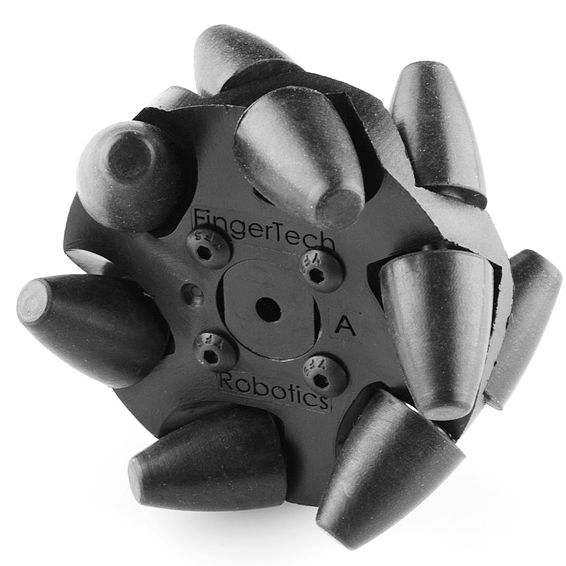
Mecanum Omni-Wheel Designed by Bengt Ilon in 1973 at the Mecanum AB Company

Mecanum Wheel

Mecanum Wheel

Mecanum Omni-Directional Wheel

Mecanum Omni-Directional Wheel

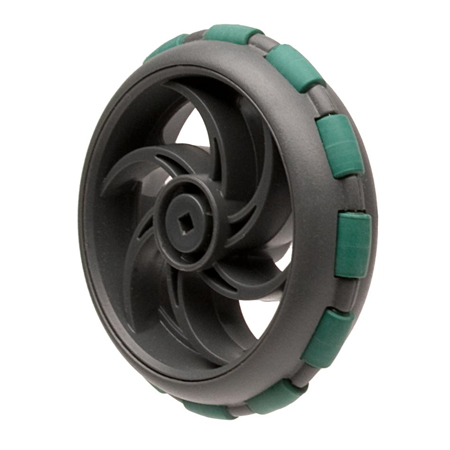
Vex Omni-Directional Wheel

Vex Omni-Directional Wheel

Vex Omni-Directional Wheel

Damon WH-01 Omni Directional Wheel (hexagon hole)
(Outer Diameter:60mm, Inner Diameter:11mm, Material: Nylon)

Damon WH-01 Omni-Directional Wheel

Damon WH-01 Omni-Directional Wheel

Kornylak Omni-Directional Wheel

Kornylak Omni-Directional Wheel

Kornylak Omni-Directional Wheel

Kornylak Transwheel

Kornylak Transwheel

Kornylak Transwheel

Kornylak Omni-Directional Wheel

Kornylak Omni-Directional Wheel

Kornylak Omni-Directional Wheel

The Blossoming Lotus: LEGO Kinetic Art

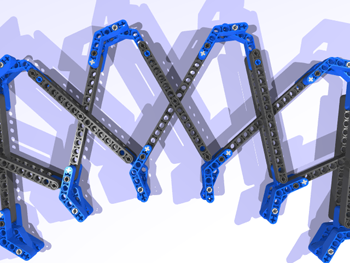
I call this creation The Blossoming Lotus.  It was originally posted on Online Cortex, but I have decided to repost it here because its just plain fun. Basically it is a large 2D version of a Hoberman sphere. Why did I not make a large Hoberman sphere? First, the parts to make the circle cost almost $80 US. Second, I have other more pressing projects I am working on.

The Blossoming Lotus Kinetic Art

The Blossoming Lotus Kinetic Art

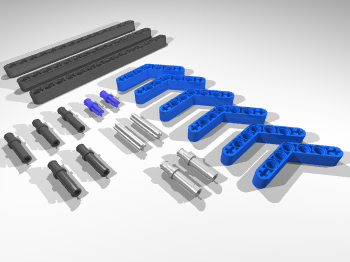
It is about 4 feet in diameter when completely extended and is pretty impressive. Its relatively easy to make. My design consists of constructing each petal with two interlocking pieces: a single-claw arm and a double-claw arm. The parts needed to make the two arms are illustrated below.

Parts for a Single Lotus Petal

Parts for a Single Lotus Petal

To make the entire circle of petals, one needs 20 copies of each petal. The job then is to put them all together. I will post detailed instructions on a website in the near future. For now, here is a closeup of the blossom when completed.

Close Up of the Lotus Blossom

Close Up of the Lotus Blossom

And of course, the project wouldn’t be complete without that animation above made with MLCAD, L3PAO, and POV Ray. The animation was straightforward—once you get the geometry right (which is not straightforward). I will post a lesson on the geometry and the animation of this creation in the future as well. For now, enjoy.

Little Rover with Instructions and Code

I have finally compiled building instructions for my Little Rover, which can be seen above in a 3D Rendering courtesy of POVRay.  An earlier version of this rover can be seen in this YouTube video:

Little Rover Prototype Video

Rover Design

The complete detailed building instructions can be found here in this 94-page pdf file.
Warning: it is about 9MB in size.  The design is not entirely compatible with the standard NXT Mindstorms Kit.  This design relies on two touch sensors, several 1×9 bent liftarms, and as far as I can tell from Peeron, the NXT Kit has only two.  This may require a little redesign.  Other compatibility issues and their solutions can be found in the Parts List in the instructions.

Remember to download the software DriveSmart here as well.
Installation instructions can be found in the zip file.

DriveSmart Code

The main file is called DriveSmart.rbt.  Drive Smart runs four threads:

Drive Thread
The Drive Thread (lowest one of the four) drives until a warning flag is set by one of the other
threads. It then waits until it gets an all clear message via the Wait Until Free block, and then
it starts driving again.

Bumper Threads
There are two threads that monitor the bumpers.
The reaction is only activated if nothing else is currently commanding the robot.  In this case the
bumper has been pressed and the robot will veer away from the hazard.

Ultrasound Thread
This thread monitors the ultrasound rangefinder.
The reaction is only activated if nothing else is currently commanding the robot.  When the robot
comes too close to a hazard, the robot is commanded to stop.  It then looks both ways and then turns
in the direction with more room.  If the robot is within 10 cm of a hazard on both sides, it then
backs up.

The robot can roam about a wide variety of rooms and not get stuck.
He does not detect stairs though!  So be careful.

Download: instructions and code.

Enjoy!
Kevin Knuth

LEGO NXT Motor Wiring

After posting Hacking the LEGO Mindstorms NXT Standard Motor, I received several requests for more information regarding the wiring of the motor.

The NXT cable has six wires. Below I list a table with the wires and their colors:

Color Name
White Motor 1
Black Motor 2
Red GND
Green 4.3 Volts
Yellow Tach01
Blue Tach02

The WHITE and BLACK wires (Motor 1 and Motor 2) deliver power to the motor.
If standard batteries are used, the potential difference will be 9 volts, otherwise the NiMH rechargeable batteries provide 7.2 volts. If the white wire is positive and black is negative, the motor will turn one way. If you reverse the polarity, the motor will turn the other way.

The RED wire is connected to the ground (GND). Note that in the sensors, RED and BLACK are connected to one another. This is not the case in the motors.

The GREEN wire is connected to the +4.3 NXT power supply.

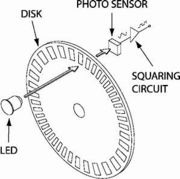
The YELLOW and BLUE wires are connected to the quadrature encoder, also called an incremental rotary encoder.

Basic Rotary Encoder

Square waves from quadrature encoder

As shown in the figure from Wikipedia above, (http://en.wikipedia.org/wiki/Quadrature_encoder) the wires return square wave pulses that are 90 degrees out of phase. If the rising pulse on TACH00 leads the rising pulse of TACH01 by 90 degrees, then the motor is going forward. If it instead lags by 90 degrees, the motor is rotating backwards. One complete square wave cycle corresponds to 2 degrees of rotation. In the diagram above, if TACH00 refers to A and TACH01 refers to B, we can see that the motor is going backwards as TACH00 is lagging TACH 01.

By measuring the frequency of the square wave oscillation, one can compute the rotational velocity. Since one cycle corresponds to 2 degrees of rotation, one cycle per second (1 Hz) corresponds to 2 degrees/sec. If you record a frequency of X Hz, then the rotation rate is 2X cycles/sec.

Note also that by tracking both square waves, you can identify quarter cycles, which gives you a resolution of 1/4 of 2 degrees, which is 0.5 degrees.

The motor speed is controlled by pulse-width modulation (pwm), which works by driving the motor with a variable duty cycle square wave. This effectively turns the motor on and off, fast. The longer it is on, the more torque it will generate and the faster it will go.

These details and more can be found in the excellent book: Extreme: NXT with a sneak peak here.

Additional details can be found in the excellent book Extreme NXT: Extending the LEGO MINDSTORMS NXT to the Next Level (Technology in Action) by Michael Gasperi, Philippe E. Hurbain, and Isabelle L. Hurbain.

Philo uploaded a comment, and reminded me that “Note that there are some internal photos of the NXT motor here: http://philohome.com/nxtmotor/nxtmotor.htm and schematics here: http://www.brickshelf.com/cgi-bin/gallery.cgi?i=1846577

Happy Hacking!

10+1 LEGO Design and Engineering Tips

1. Use only parts that are necessary…no less and no more.
In the course of trying to fortify a LEGO construction, it is extremely easy to get carried away and add too many parts. If you are like me, you have a limited supply of parts.  Using too many parts rapidly depletes your supply and can add significant weight to your creation.  If you are building a robot, this extra weight can really slow it down.

2. Build strong connections
We all know that when stacking bricks to make a wall, you need to stagger the bricks so that the next layer of bricks holds the bricks in the lower layer together by covering up the cracks.  This is one way to build strong connections.  You can do even better by bracing the wall with a beam by pinning it to technic bricks embedded in the wall.  By adding a few carefully chosen pieces, it is possible to significantly strengthen a structure.  Just be careful not to go crazy and violate Tip #1.

3. Be aware of design constraints
Every time you add a LEGO part to your creation, you limit the possibilities of what you can make.  When you have nothing you can make anything.  When you grab a brick, you can now only make things that have that brick in it.  Each part constrains the creation. Be aware of parts or constructs or mechanisms that place too strong of a constraint on your design.  You dont have to get rid of them, but just be aware of the role they play in constraining what you do next.

4. Dont become TOO attached to your creation.
Sometimes we find that we really really like a certain aspect of the construction or a set of parts, but nothing else works. The tendency is to get rid of everything else and then build up around those parts we really like. However, these parts are placing strong constraints on the design… often too strong, which is why nothing else works. The solution is to get rid of the problem. In this case, you have to get rid of the set of parts you like because it is over-constraining the rest of the design. You dont have to destroy it (see Tip #9)… just set it aside, but be sure to remove it from your creation.

5. Be open to new ideas.
There is always more than one way to solve a problem. Be open to new, and seemingly crazy ideas. Sometimes these lead to ingenious solutions. If you suspect that you are having problems similar to those described in Tip #4, take some time out to brainstorm and see if you can come up with a new idea!

6. Build in stages.
Designing a complex structure or mechanism in one step is almost impossible. Break the construction up into stages, and consider each stage separately. Sometimes a given stage will still be too complex. If so, break that construction up into stages as well. Just be aware of the dangers in Tip #4 above. Your solution for one stage might be awesome, but if it doesn’t work well with your solution as a whole… it has to go. Again, if you have enough parts, keep your creations. Otherwise, at the very least preserve their memory by building them in a LEGO Computer Aided Design (CAD) system.

7. Watch for opportunities.
Sometimes we get lucky and we find that a part or a set of parts can serve two or more functions. This is an excellent situation as it saves you both parts, size and weight. Watching out for these opportunities, and taking advantage of them when you can, can really help make an elegant and efficient design. Just be careful not to become too attached to the idea, as you could end up in trouble as described in Tip #4.

8. Study your design.
When you are all finished, take some time to study and test your design. Consider both form and function. When considering form, you are concerned mainly with aesthetics (beauty). What do you like about the design? What dont you like? Is it too big? Is it bulky? Can it be made smaller, sleeker, more elegant? When considering function, you are concerned mainly with its operation and effficiency. Does it do what it is supposed to? Do the parts go together well? Does it vibrate? Do the gears mesh properly? Does it get stuck? Is there too much friction in the system? Could it be smoother? Is it safeguarded against parts breaking in high torque situations? Then consider the big picture. What did you do right? What did you do wrong? If you could do it over again, what would you change?

9. Keep your designs
I have mentioned this tip several times above. If you have enough parts, and enough room, keep your creations. Otherwise, at the very least preserve their memory by building them in a LEGO Computer Aided Design (CAD) system and generate building instructions. That way you can keep a good idea. Who knows if it will come in handy later?

10. Do it over again!
When building mechanisms that require careful consideration of either form or function, you should plan to make several prototypes (a prototype is a first design). Don’t destroy what you just constructed. You may need to refer to it by copying a part of the design that worked well. You may also need to see if you have improved the form or function by comparing it to your first attempt. I personally plan to make at least three prototypes until settling down with a final design.

11. Color coordinate your creation
I dont apply this rule to my first prototypes, but as I settle in on a final design, I work to choose the brick colors carefully. Of course, we do not always have enough parts to do this, but it is worth the extra effort. Colors scattered all over a design leads the eye to seeing it as haphazard rather than elegant. A careful choice of colors can really enhance the form of your creation. You can also use colors to enhance the function by color-coding functional segments of your design. This is maybe better for illustrative purposes (as in a LEGO CAD design), but usually I choose the latter and aim for an elegant coloration.

Kevin Knuth
Albany NY

Bad Behavior has blocked 134 access attempts in the last 7 days.

Content Protected Using Blog Protector By: PcDrome.