BrickEngineer: LEGO Design

LEGO Engineering for LEGO NXT and Robot Enthusiasts

KnuthLab LEGO Exploration Rover


Click here to visit HobbyTron.com

Image of KnuthLab Exploration Rover

KnuthLab Exploration Rover with Researchers A. Fischer and N. Malakar

The Knuth Cyberphysics Laboratory in the University at Albany Physics Department has developed the KnuthLab LEGO Exploration Rover, which acts as a testbed for robotic intelligence and navigation software. Development of this rover was funded by a NASA SBIR Award (Advanced Bayesian Methods for Lunar Surface Navigation) through Autonomous Exploration Inc. as well as a University at Albany Faculty Research Award (Developing Robotic Explorers, PI: K.H. Knuth).

The LEGO Exploration Rover is powered by six NXT Standard Motors in a Rocker-Bogie suspension system used in all of the NASA Mars rover designs. The rover is approximately 1.5 ft high with a 1 ft x 1.5 ft base. It is larger than the NASA Sojourner Rover, which was part of the Pathfinder Mission to Mars in 1997, and smaller than the Mars Exploration Rovers Spirit and Opportunity. It can safely carry a payload of 8 pounds.

Image of KnuthLab LEGO Exploration Rover

KnuthLab LEGO Exploration Rover


The LEGO Exploration Rover has two laptop bays built into the box-like frame in which it can carry two Asus Eee Laptops for onboard processing. The wheels are controlled by two LEGO NXT bricks, which can communicate with the laptops via Bluetooth. The rocker-bogie suspension and low speed allows it to handle relatively rugged terrain and steep grades.

The white frame mounted on top of the rover is the Bayesian Vision-Based Navigation System being developed by Autonomous Exploration Inc. for NASA.

Check back, as we will be posting videos of its operation and discussing some of the important design features.

A Catalog of Omni-directional or Holonomic Wheels for LEGO Robots

I have been researching the possibilities for omni-directional or holonomic wheels for LEGO robots. An omni-directional or holonomic wheel is one that can roll not just backwards and forwards, but sideways as well.

New Rotocaster Omni-Directional Wheel

New Rotocaster Omni-Directional Wheel

While these are often used on robots with three wheels where all three rotate at different rates allowing the robot to go in any direction,

Three-Wheeled Omni-Wheel Prototype by Xander Soldaat at Bot Bench

Three-Wheeled Omni-Wheel Prototype by Xander Soldaat at Bot Bench (click on image to see more)


I am interested in using these on a rover that can employ differential steering smoothly without skidding.

There are several different options that one can consider. LEGO purists may consider making their own omni-directional wheel designs out of only official LEGO parts. Another option is to purchase manufactured omni-directional wheels. These come in two classes: those that are designed to be LEGO compatible, and those that are not LEGO compatible. In the latter case, one would have to construct some kind of coupling mechanism to enable the wheel to connect to LEGO parts.

Here are some of the options that I have found.

Omni-Directional Wheels Constructed from LEGO Parts

Omni-Directional LEGO Wheels by Xander at Bot Bench
These wheels use the LEGO pulley to get a six-fold symmetry. Each “wheel” uses 12 LEGO wheels. For archiving purposes, here are three pictures. Please visit Xander at Bot Bench for larger images and more details.

Omni-Directional LEGO Wheels by Xander Soldaat at Bot Bench

Omni-Directional LEGO Wheels by Xander Soldaat at Bot Bench

Omni-Directional LEGO Wheels by Xander Soldaat at Bot Bench

Details of Omni-Directional LEGO Wheels by Xander Soldaat at Bot Bench

Omni-Directional LEGO Wheels by Xander Soldaat at Bot Bench

Details of Omni-Directional LEGO Wheels by Xander Soldaat at Bot Bench

This amazing tank by Peer Kreuger also sports omni-directional wheels made from LEGO parts

LEGO Tank with LEGO Omni-Directional Wheels

LEGO Tank with LEGO Omni-Directional Wheels

The Omni Bot v2 by jason701802 also sports omni-directional wheels

Omni Bot v2 by jason701802

Omni Bot v2 by jason701802

LEGO-compatible Manufactured Omni-Directional Wheels

This LEGO-compatible wheel is made by the School of Robotics

School of Robotics Omni-Directional Wheels

School of Robotics Omni-Directional Wheels

Rotacaster makes a LEGO-compatible omni-directional wheel:

Rotacaster Robot Wheel (LEGO-compatible)

Rotacaster Robot Wheel (LEGO-compatible)

Rotacaster is also coming out with a new design

New Rotocaster Omni-Directional Wheel

New Rotocaster Omni-Directional Wheel

Rotacaster also produces several non-LEGO compatible designs.

Tetrix also makes LEGO-compatible Omni-Directional Wheels

Tetrix Omni-Directional Wheels

Tetrix Omni-Directional Wheels

General Manufactured Omni-Directional Wheels

Mecanum Omni-Wheel Designed by Bengt Ilon in 1973 at the Mecanum AB Company

Mecanum Wheel
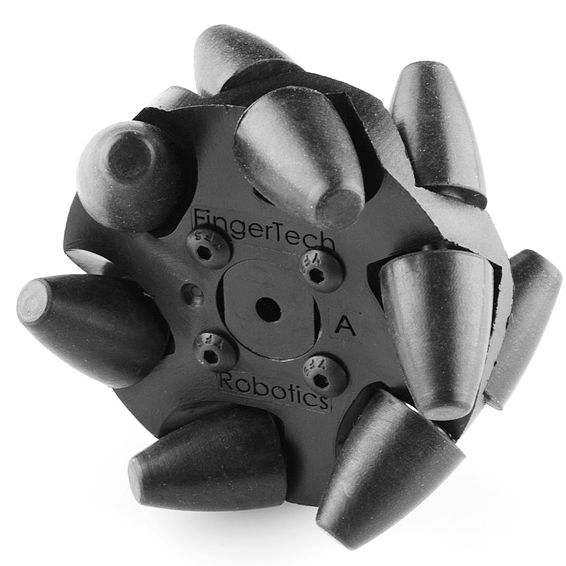
Mecanum Wheel

Mecanum Omni-Directional Wheel

Mecanum Omni-Directional Wheel

Vex Omni-Directional Wheel
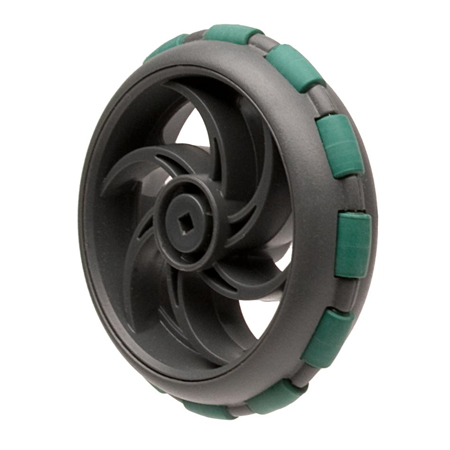
Vex Omni-Directional Wheel

Vex Omni-Directional Wheel

Damon WH-01 Omni Directional Wheel (hexagon hole)
(Outer Diameter:60mm, Inner Diameter:11mm, Material: Nylon)

Damon WH-01 Omni-Directional Wheel

Damon WH-01 Omni-Directional Wheel

Kornylak Omni-Directional Wheel

Kornylak Omni-Directional Wheel

Kornylak Omni-Directional Wheel

Kornylak Transwheel

Kornylak Transwheel

Kornylak Transwheel

Kornylak Omni-Directional Wheel

Kornylak Omni-Directional Wheel

Kornylak Omni-Directional Wheel

MATLAB Packages for the NXT

There are now several MATLAB packages for robotics, and specifically for the NXT.  One paradigm is to run the code on a PC and have it communicate direct commands to the NXT Brick via Bluetooth or USB.  I have found this paradigm to be a bit dangerous since in the event of a MATLAB crash or a miscommunication, the NXT Brick will continue with its last command until ordered to stop.  This has the potential to destroy your robot.  The paradigm that I prefer to use is to write several programs that run on the brick.  These programs take commands from files on the brick that can be uploaded rapidly from the PC.  The MATLAB code then is in charge of sending the command files and starting and stopping programs.  In the event of a MATLAB crash or communication failure, the software running on the NXT Brick can be designed to terminate gracefully.

Here are the MATLAB packages that I know of.  The first two are specifically geared toward the NXT; whereas the last is a general robotics package.

Little Rover with Instructions and Code

I have finally compiled building instructions for my Little Rover, which can be seen above in a 3D Rendering courtesy of POVRay.  An earlier version of this rover can be seen in this YouTube video:

Little Rover Prototype Video

Rover Design

The complete detailed building instructions can be found here in this 94-page pdf file.
Warning: it is about 9MB in size.  The design is not entirely compatible with the standard NXT Mindstorms Kit.  This design relies on two touch sensors, several 1×9 bent liftarms, and as far as I can tell from Peeron, the NXT Kit has only two.  This may require a little redesign.  Other compatibility issues and their solutions can be found in the Parts List in the instructions.

Remember to download the software DriveSmart here as well.
Installation instructions can be found in the zip file.

DriveSmart Code

The main file is called DriveSmart.rbt.  Drive Smart runs four threads:

Drive Thread
The Drive Thread (lowest one of the four) drives until a warning flag is set by one of the other
threads. It then waits until it gets an all clear message via the Wait Until Free block, and then
it starts driving again.

Bumper Threads
There are two threads that monitor the bumpers.
The reaction is only activated if nothing else is currently commanding the robot.  In this case the
bumper has been pressed and the robot will veer away from the hazard.

Ultrasound Thread
This thread monitors the ultrasound rangefinder.
The reaction is only activated if nothing else is currently commanding the robot.  When the robot
comes too close to a hazard, the robot is commanded to stop.  It then looks both ways and then turns
in the direction with more room.  If the robot is within 10 cm of a hazard on both sides, it then
backs up.

The robot can roam about a wide variety of rooms and not get stuck.
He does not detect stairs though!  So be careful.

Download: instructions and code.

Enjoy!
Kevin Knuth

LEGO NXT Motor Wiring

After posting Hacking the LEGO Mindstorms NXT Standard Motor, I received several requests for more information regarding the wiring of the motor.

The NXT cable has six wires. Below I list a table with the wires and their colors:

Color Name
White Motor 1
Black Motor 2
Red GND
Green 4.3 Volts
Yellow Tach01
Blue Tach02

The WHITE and BLACK wires (Motor 1 and Motor 2) deliver power to the motor.
If standard batteries are used, the potential difference will be 9 volts, otherwise the NiMH rechargeable batteries provide 7.2 volts. If the white wire is positive and black is negative, the motor will turn one way. If you reverse the polarity, the motor will turn the other way.

The RED wire is connected to the ground (GND). Note that in the sensors, RED and BLACK are connected to one another. This is not the case in the motors.

The GREEN wire is connected to the +4.3 NXT power supply.

The YELLOW and BLUE wires are connected to the quadrature encoder, also called an incremental rotary encoder.

Basic Rotary Encoder

Square waves from quadrature encoder

As shown in the figure from Wikipedia above, (http://en.wikipedia.org/wiki/Quadrature_encoder) the wires return square wave pulses that are 90 degrees out of phase. If the rising pulse on TACH00 leads the rising pulse of TACH01 by 90 degrees, then the motor is going forward. If it instead lags by 90 degrees, the motor is rotating backwards. One complete square wave cycle corresponds to 2 degrees of rotation. In the diagram above, if TACH00 refers to A and TACH01 refers to B, we can see that the motor is going backwards as TACH00 is lagging TACH 01.

By measuring the frequency of the square wave oscillation, one can compute the rotational velocity. Since one cycle corresponds to 2 degrees of rotation, one cycle per second (1 Hz) corresponds to 2 degrees/sec. If you record a frequency of X Hz, then the rotation rate is 2X cycles/sec.

Note also that by tracking both square waves, you can identify quarter cycles, which gives you a resolution of 1/4 of 2 degrees, which is 0.5 degrees.

The motor speed is controlled by pulse-width modulation (pwm), which works by driving the motor with a variable duty cycle square wave. This effectively turns the motor on and off, fast. The longer it is on, the more torque it will generate and the faster it will go.

These details and more can be found in the excellent book: Extreme: NXT with a sneak peak here.

Additional details can be found in the excellent book Extreme NXT: Extending the LEGO MINDSTORMS NXT to the Next Level (Technology in Action) by Michael Gasperi, Philippe E. Hurbain, and Isabelle L. Hurbain.

Philo uploaded a comment, and reminded me that “Note that there are some internal photos of the NXT motor here: http://philohome.com/nxtmotor/nxtmotor.htm and schematics here: http://www.brickshelf.com/cgi-bin/gallery.cgi?i=1846577

Happy Hacking!

Basic Electronics Supplies for Beginners

I am getting interested in more general robotics projects, but will still be relying on LEGOs for their construction.  The LEGO brick is a bit too limited with its specialized programming languages and limited sensor and motor ports.

So for those interested in some LEGO electronics hacking, here is a list of supplies that will get you up and running fast for about $275… just a but more than the cost of a single Mindstorms kit.  Plus you’ll now get to learn electronics!

First, check out the book:
Making Things Talk: Practical Methods for Connecting Physical Objects

This book explains how to wire, program and interconnect various microcontrollers, some of which are very closely related to those used by the NXT Brick.

Supply List

Item Number Description Quantity Unit Price Total
Amazon.com
  Making Things Talk 1  $19.79 $19.79
Jameco.com
19166 Desoldering Pump 1 $4.95 $4.95
159291 Wire Stripper 1 $10.15 $10.15
161411 Diagonal Cutter 1 $7.49 $7.49
35474 Needlenose Pliers 1 $5.49 $5.49
127271 Mini Screwdriver 1 $1.89 $1.89
681002 Helping Hands 1 $8.75 $8.75
159611 Power Connector 2 $1.79 $3.58
10444 Alligator Test Clip Leads 2 $4.39 $8.78
103377 Header Pins 10 $0.16 $1.60
119011 Push Button (PCB Type) 10 $0.27 $2.70
29082 Potentiometer 2 $1.05 $2.10
242115 LM1117T-3.3 Voltage Regulator 3 $1.39 $4.17
51262 7805T 5v Voltage regulator 3 $0.32 $0.96
38236 2N2222A Transistor NPN 5 $0.41 $2.05
32993 TIP120 Power Transistor 5 $0.45 $2.25
643488 3.3V Zener Diode 5 $0.03 $0.16
35991 1N4004 Diode 5 $0.04 $0.20
152792 LED Yellow 10 $0.17 $1.70
152805 LED Red 10 $0.21 $2.10
153139 LED Orange 10 $0.35 $3.50
156962 LED Green (567 nm) 10 $0.20 $2.00
334529 LED Bargraph Red 1 $1.31 $1.31
334537 LED Bargraph Yellow 1 $1.23 $1.23
334511 LED Bargraph Green 1 $1.28 $1.28
17187 7-segment LED Display 3 $0.88 $2.64
38818 4-switch DIP 4 $0.48 $1.92
38842 8-switch DIP 2 $0.89 $1.78
103166 Resistor Refill 1 $12.95 $12.95
15270 0.1 uF 10 $0.15 $1.53
94161 1 uF 10 $0.12 $1.20
29891 10 uF 10 $0.06 $0.60
158394 100 uF 10 $0.11 $1.08
MPJA
4443 TE Solderless Breadboard 1 $4.95 $4.95
4447 TE Large Solderless Breadboard 1 $22.95 $22.95
7027 TE Jumpers 2 $3.95 $7.90
14213 TE Digital Multimeter 1 $14.95 $14.95
15860 TL Mini Soldering Station 1 $14.95 $14.95
Sparkfun
Wiring Platform DEV-00744 1 $84.95 $84.95
Radio Shack
64-025 Lead Free Solder 1 $3.89 $3.89

Note that the light gray items are optional, and not necessary.

Also, this list does not include some sort of power supply. Pulling one out of an old computer is an easy option. Or rechargeable batteries work well too (in which case you will need battery holders).

Last, there are special items in the book Making Things Talk that you may decide to purchase separately, such as flex sensors, or bluetooth boards, etc.

You can store your electronics in much the same way you store your small LEGO parts. Check out the article on Storage.

Enjoy Hacking!

Bad Behavior has blocked 135 access attempts in the last 7 days.

Content Protected Using Blog Protector By: PcDrome.